Serial Plotter Control (HP 7475A)
Concentric Polygon Generator + Serial Plotter Control (HP 7475A)
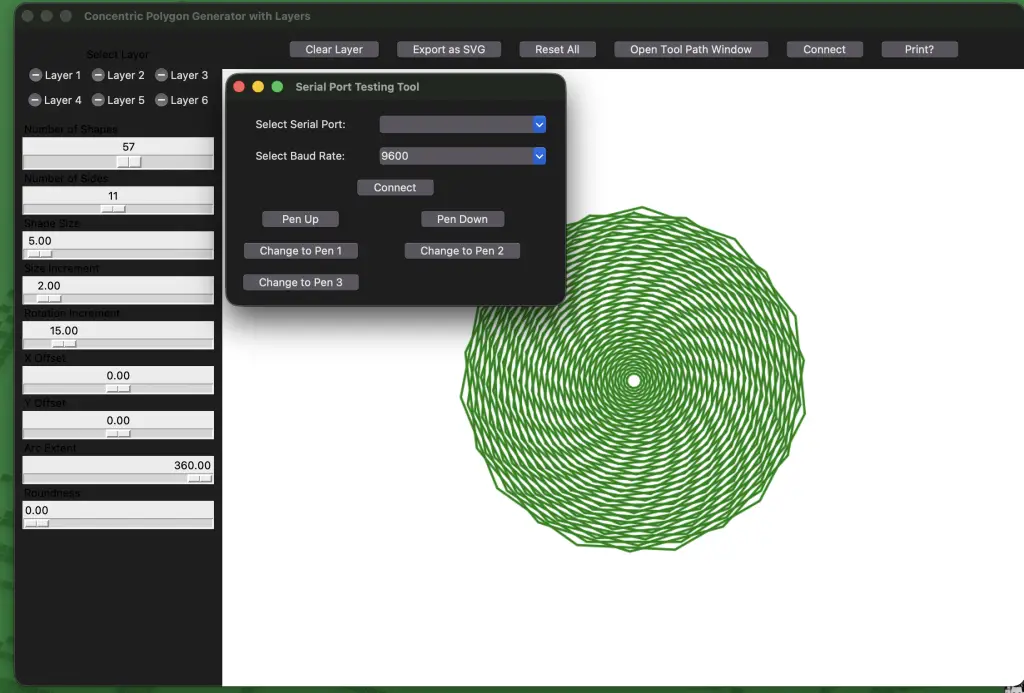
This project is a Concentric Polygon Generator with Layered Editing, HPGL Tool Path Generation, and direct serial control for pen plotters like the HP 7475A. It provides a graphical interface for creating polygon-based designs, exporting SVG, previewing HPGL toolpaths, and sending plot commands to a connected plotter.
Features
Multi-Layer Editing
Up to six independent layers, each with its own properties: number of sides, size, incremental scaling, rotation, offsets, arc extent, roundness, and pen color.
SVG Export + Cleanup
Export designs to SVG and automatically post-process the file to remove unwanted clipPath rectangles / borders that can interfere with downstream toolpath generation.
HPGL Tool Path Preview
Convert the SVG into HPGL, visualize tool paths with color-coded pens, and estimate plotting time before committing to a plot.
Pen-Up / Pen-Down Visualization
Pen-up travel moves are shown as dashed blue paths; pen-down strokes reflect the selected pen colors—matching how the plotter will draw.
Serial Connection Window (Plotter I/O)
Includes a small serial connection panel for selecting a port and establishing a connection to the plotter. Once connected, the app can send HPGL commands directly—enabling a workflow that goes from design → toolpath → plot without leaving the interface.
One-Interface Workflow
The intent is a single environment for iteration: design changes update the preview, HPGL regenerates from the same geometry, and the connected plotter can be driven from the same session.
Main Window
Main GUI
Shape Control: Sliders to control the number of sides, size, rotation, and more for each layer.
Color Selection: Choose from predefined colors for each layer.
Export to SVG: Export the current design as an SVG file.
Tool Path Generation: Open a new window to convert the SVG into HPGL code and visualize tool paths.
Tool Path Window
Tool Path Preview
HPGL Code Generation: Generate and view the HPGL code for plotting.
Tool Path Visualization: Visualize the pen movements, with pen-down movements shown in the correct color, and pen-up movements as dashed lines.
Plotting Time Estimation: Estimate how long it will take to plot the design on a plotter.
Installation
Clone the repository:
git clone https://github.com/your-repository.git
cd your-repository
Install the required dependencies:
pip install -r requirements.txt
Running the Project
To run the project, execute the following command in your terminal:
python main.py
